https://www.stereolabs.com/en-kr/developers/release
ZED SDK 4.1 - Download | Stereolabs
The ZED SDK allows you to add depth, motion sensing and spatial AI to your application. Available as a standalone installer, it includes applications, tools and sample projects with source code.
www.stereolabs.com
다음 공식홈페이지에서 sdk 다운
CUDA 12, Ubuntu 20.4.1 버전 사용
https://github.com/stereolabs/zed-opencv/blob/master/python/zed-opencv.py
zed-opencv/python/zed-opencv.py at master · stereolabs/zed-opencv
ZED SDK interface sample for OpenCV. Contribute to stereolabs/zed-opencv development by creating an account on GitHub.
github.com
zed에서 openCV를 사용하기 위해서 다음 셈플코드 사용
zed는 sl.Mat 형태 행렬을 사용한다. 그래서 get_data()를 사용해서 numpy로 바꿔준후 cv2함수 사용함
다음은 특정 물체의 전처리가 다음 단계를 가정하고 특정 색상 필터를 적용한다.
https://youtu.be/zVuPIBW4Ri8?si=Cqiah1YHA3arAHow
여기서 두 코드를 합칠때 mouse_callback 함수에서 에러가 떠서 마우스 클릭 픽셀의 정보를 가져오는게 아닌
내가 임의로 지정한 color 값을 사용함.
 # 마스크 이미지로 원본 이미지에서 범위값에 해당되는 영상 부분을 획득합니다.
            img_result = cv2.bitwise_and(img_color, img_color, mask=img_mask)


            numOfLabels, img_label, stats, centroids = cv2.connectedComponentsWithStats(img_mask)

            for idx, centroid in enumerate(centroids):
                if stats[idx][0] == 0 and stats[idx][1] == 0:
                    continue

                if np.any(np.isnan(centroid)):
                    continue

                x,y,width,height,area = stats[idx]
                centerX,centerY = int(centroid[0]), int(centroid[1])

                x_depth = round(centerX)
                y_depth = round(centerY)
                err, point_cloud_value = point_cloud.get_value(x_depth, y_depth)

                red = [0,0,255]
                cv2.circle(copy_a,(x, y),50,red,4)
                #cv2.imshow("a",copy_a)

                if math.isfinite(point_cloud_value[2]):
                    distance = math.sqrt(point_cloud_value[0] * point_cloud_value[0] +
                                    point_cloud_value[1] * point_cloud_value[1] +
                                    point_cloud_value[2] * point_cloud_value[2])
                    #print(f"Distance to Camera at {{{x};{y}}}: {distance}")
                #else :
                    #print(f"The distance can not be computed at {{{x};{y}}}")
                    #print(centerX, centerY)

                if area > 50:
                    fontFace = cv2.FONT_HERSHEY_SIMPLEX
                    fontScale = 0.3
                    color = (255, 0, 0)
                    idx = str(idx)
                    distance = str(distance)
                    a,b = str(centerX), str(centerY)
                    cv2.circle(img_color, (centerX, centerY), 10, (0,0,255), 10)
                    cv2.rectangle(img_color, (x,y), (x+width,y+height), (0,0,255))
                    cv2.putText(img_color, idx+" x="+a+" y="+b + " distance=" + distance, (centerX,centerY), fontFace,fontScale,color)
여기서 인식된 범위 centerX, centerY좌표를 가지고 distance를 계산한다.
결과화면
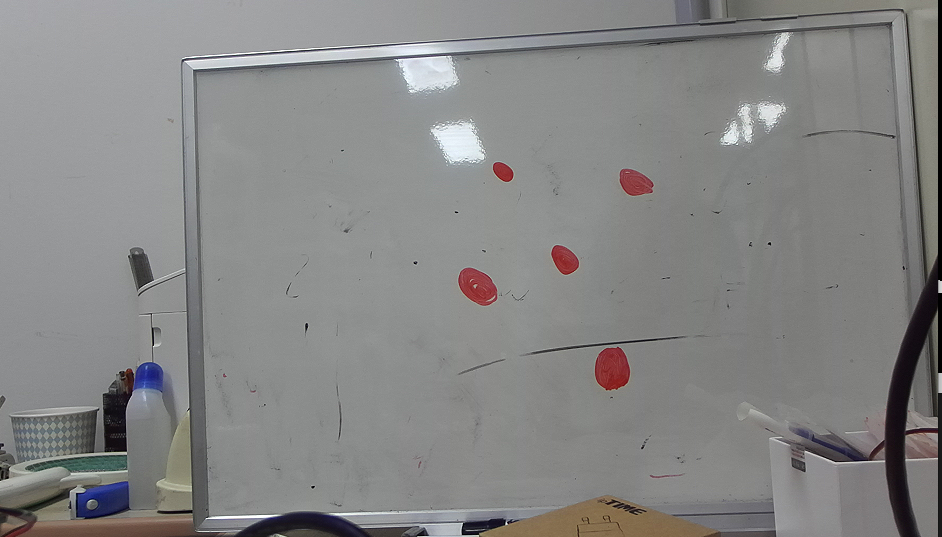
빨간부분이 인식할 부분
#전체 코드 35번째줄
#빨간 부분픽셀의 값을 임의로 설정
color = [45,45,132]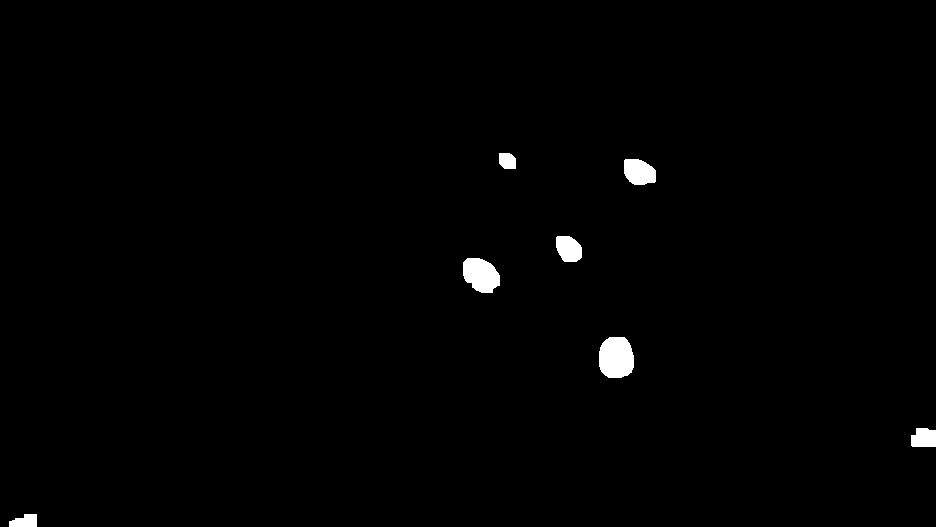
빨간 부분만 필터링
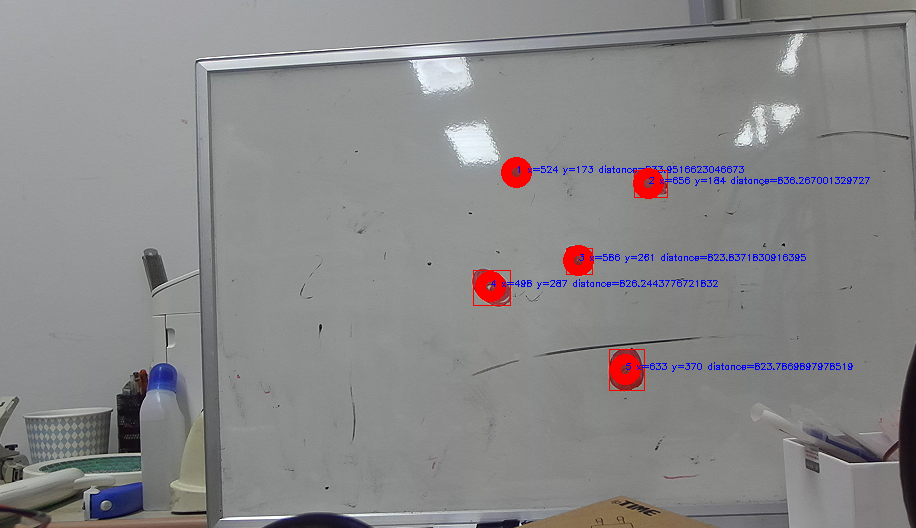
인식된 각 포인트의 위치 거리 측정
전체코드
import sys
import numpy as np
import pyzed.sl as sl
import cv2
import math

help_string = "[s] Save side by side image [d] Save Depth, [n] Change Depth format, [p] Save Point Cloud, [m] Change Point Cloud format, [q] Quit"
prefix_point_cloud = "Cloud_"
prefix_depth = "Depth_"
path = "./"

count_save = 0
mode_point_cloud = 0
mode_depth = 0
point_cloud_format_ext = ".ply"
depth_format_ext = ".png"

hsv = 68
lower_blue1 = 45
upper_blue1 = 37
lower_blue2 = 0
upper_blue2 = 0
lower_blue3 = 0
upper_blue3 = 0
color = []

def nothing(x):
    pass

def mouse_callback(event, x, y, flags, param):
    global hsv, lower_blue1, upper_blue1, lower_blue2, upper_blue2, lower_blue3, upper_blue3, threshold

    # 마우스 왼쪽 버튼 누를시 위치에 있는 픽셀값을 읽어와서 HSV로 변환합니다.

    color = [45,45,132]
    one_pixel = np.uint8([[color]])
    hsv = cv2.cvtColor(one_pixel, cv2.COLOR_BGR2HSV)
    hsv = hsv[0][0]

    threshold = cv2.getTrackbarPos('threshold', 'img_result')

    # HSV 색공간에서 마우스 클릭으로 얻은 픽셀값과 유사한 필셀값의 범위를 정합니다.
    if hsv[0] < 10:
            print("case1")
            lower_blue1 = np.array([hsv[0]-10+180, threshold, threshold])
            upper_blue1 = np.array([180, 255, 255])
            lower_blue2 = np.array([0, threshold, threshold])
            upper_blue2 = np.array([hsv[0], 255, 255])
            lower_blue3 = np.array([hsv[0], threshold, threshold])
            upper_blue3 = np.array([hsv[0]+10, 255, 255])
            #     print(i-10+180, 180, 0, i)
            #     print(i, i+10)

    elif hsv[0] > 170:
            print("case2")
            lower_blue1 = np.array([hsv[0], threshold, threshold])
            upper_blue1 = np.array([180, 255, 255])
            lower_blue2 = np.array([0, threshold, threshold])
            upper_blue2 = np.array([hsv[0]+10-180, 255, 255])
            lower_blue3 = np.array([hsv[0]-10, threshold, threshold])
            upper_blue3 = np.array([hsv[0], 255, 255])
            #     print(i, 180, 0, i+10-180)
            #     print(i-10, i)
    else:
            print("case3")
            lower_blue1 = np.array([hsv[0], threshold, threshold])
            upper_blue1 = np.array([hsv[0]+10, 255, 255])
            lower_blue2 = np.array([hsv[0]-10, threshold, threshold])
            upper_blue2 = np.array([hsv[0], 255, 255])
            lower_blue3 = np.array([hsv[0]-10, threshold, threshold])
            upper_blue3 = np.array([hsv[0], 255, 255])
            #     print(i, i+10)
            #     print(i-10, i)

    print(hsv[0])
    print("@1", lower_blue1, "~", upper_blue1)
    print("@2", lower_blue2, "~", upper_blue2)
    print("@3", lower_blue3, "~", upper_blue3)


cv2.namedWindow('img_color')
cv2.setMouseCallback('img_color', mouse_callback)

cv2.namedWindow('img_result')
cv2.createTrackbar('threshold', 'img_result', 0, 255, nothing)
cv2.setTrackbarPos('threshold', 'img_result', 30)


def point_cloud_format_name():
    global mode_point_cloud
    if mode_point_cloud > 3:
        mode_point_cloud = 0
    switcher = {
        0: ".xyz",
        1: ".pcd",
        2: ".ply",
        3: ".vtk",
    }
    return switcher.get(mode_point_cloud, "nothing")

def depth_format_name():
    global mode_depth
    if mode_depth > 2:
        mode_depth = 0
    switcher = {
        0: ".png",
        1: ".pfm",
        2: ".pgm",
    }
    return switcher.get(mode_depth, "nothing")

def save_point_cloud(zed, filename) :
    print("Saving Point Cloud...")
    tmp = sl.Mat()
    zed.retrieve_measure(tmp, sl.MEASURE.XYZRGBA)
    saved = (tmp.write(filename + point_cloud_format_ext) == sl.ERROR_CODE.SUCCESS)
    if saved :
        print("Done")
    else :
        print("Failed... Please check that you have permissions to write on disk")

def save_depth(zed, filename) :
    print("Saving Depth Map...")
    tmp = sl.Mat()
    zed.retrieve_measure(tmp, sl.MEASURE.DEPTH)
    saved = (tmp.write(filename + depth_format_ext) == sl.ERROR_CODE.SUCCESS)
    if saved :
        print("Done")
    else :
        print("Failed... Please check that you have permissions to write on disk")

def save_sbs_image(zed, filename) :

    image_sl_left = sl.Mat()
    zed.retrieve_image(image_sl_left, sl.VIEW.LEFT)
    image_cv_left = image_sl_left.get_data()

    image_sl_right = sl.Mat()
    zed.retrieve_image(image_sl_right, sl.VIEW.RIGHT)
    image_cv_right = image_sl_right.get_data()

    sbs_image = np.concatenate((image_cv_left, image_cv_right), axis=1)

    cv2.imwrite(filename, sbs_image)


def process_key_event(zed, key) :
    global mode_depth
    global mode_point_cloud
    global count_save
    global depth_format_ext
    global point_cloud_format_ext

    if key == 100 or key == 68:
        save_depth(zed, path + prefix_depth + str(count_save))
        count_save += 1
    elif key == 110 or key == 78:
        mode_depth += 1
        depth_format_ext = depth_format_name()
        print("Depth format: ", depth_format_ext)
    elif key == 112 or key == 80:
        save_point_cloud(zed, path + prefix_point_cloud + str(count_save))
        count_save += 1
    elif key == 109 or key == 77:
        mode_point_cloud += 1
        point_cloud_format_ext = point_cloud_format_name()
        print("Point Cloud format: ", point_cloud_format_ext)
    elif key == 104 or key == 72:
        print(help_string)
    elif key == 115:
        save_sbs_image(zed, "ZED_image" + str(count_save) + ".png")
        count_save += 1
    else:
        a = 0

def print_help() :
    print(" Press 's' to save Side by side images")
    print(" Press 'p' to save Point Cloud")
    print(" Press 'd' to save Depth image")
    print(" Press 'm' to switch Point Cloud format")
    print(" Press 'n' to switch Depth format")


def main() :

    # Create a ZED camera object
    zed = sl.Camera()

    # Set configuration parameters
    input_type = sl.InputType()
    if len(sys.argv) >= 2 :
        input_type.set_from_svo_file(sys.argv[1])
    init = sl.InitParameters(input_t=input_type)
    init.camera_resolution = sl.RESOLUTION.HD1080
    init.depth_mode = sl.DEPTH_MODE.PERFORMANCE
    init.coordinate_units = sl.UNIT.MILLIMETER

    # Open the camera
    err = zed.open(init)
    if err != sl.ERROR_CODE.SUCCESS :
        #print(repr(err))
        zed.close()
        exit(1)

    # Display help in console
    print_help()

    # Set runtime parameters after opening the camera
    runtime = sl.RuntimeParameters()

    # Prepare new image size to retrieve half-resolution images
    image_size = zed.get_camera_information().camera_configuration.resolution
    image_size.width = image_size.width /2
    image_size.height = image_size.height /2

    # Declare your sl.Mat matrices
    image_zed = sl.Mat(image_size.width, image_size.height, sl.MAT_TYPE.U8_C4)
    depth_image_zed = sl.Mat(image_size.width, image_size.height, sl.MAT_TYPE.U8_C4)
    point_cloud = sl.Mat()

    key = ' '
    while key != 113 :
        err = zed.grab(runtime)
        if err == sl.ERROR_CODE.SUCCESS :
            # Retrieve the left image, depth image in the half-resolution
            zed.retrieve_image(image_zed, sl.VIEW.LEFT, sl.MEM.CPU, image_size)
            zed.retrieve_image(depth_image_zed, sl.VIEW.DEPTH, sl.MEM.CPU, image_size)
            # Retrieve the RGBA point cloud in half resolution
            zed.retrieve_measure(point_cloud, sl.MEASURE.XYZRGBA, sl.MEM.CPU, image_size)

            # To recover data from sl.Mat to use it with opencv, use the get_data() method
            # It returns a numpy array that can be used as a matrix with opencv
            image_ocv = image_zed.get_data()
            depth_image_ocv = depth_image_zed.get_data()

            cv2.imshow("Imge", image_ocv)
            #cv2.imshow("Depth", depth_image_ocv)
            copy_a = image_ocv.copy()


            key = cv2.waitKey(10)

            process_key_event(zed, key)

            x = round(image_size.width / 2)
            y = round(image_size.height / 2)
            err, point_cloud_value = point_cloud.get_value(x, y)

            red = [0,0,255]
            cv2.circle(copy_a,(x, y),50,red,4)
            #cv2.imshow("a",copy_a)

            if math.isfinite(point_cloud_value[2]):
                distance = math.sqrt(point_cloud_value[0] * point_cloud_value[0] +
                                    point_cloud_value[1] * point_cloud_value[1] +
                                    point_cloud_value[2] * point_cloud_value[2])
                #print(f"Distance to Camera at {{{x};{y}}}: {distance}")
            #else :
                #print(f"The distance can not be computed at {{{x};{y}}}")

             #img_color = cv2.imread('2.jpg')
            img_color  = image_ocv
            height, width = img_color.shape[:2]
            img_color = cv2.resize(img_color, (width, height), interpolation=cv2.INTER_AREA)

            # 원본 영상을 HSV 영상으로 변환합니다.
            img_hsv = cv2.cvtColor(img_color, cv2.COLOR_BGR2HSV)

            # 범위 값으로 HSV 이미지에서 마스크를 생성합니다.
            img_mask1 = cv2.inRange(img_hsv, lower_blue1, upper_blue1)
            img_mask2 = cv2.inRange(img_hsv, lower_blue2, upper_blue2)
            img_mask3 = cv2.inRange(img_hsv, lower_blue3, upper_blue3)
            img_mask = img_mask1 | img_mask2 | img_mask3

            kernel = np.ones((11,11), np.uint8)
            img_mask = cv2.morphologyEx(img_mask, cv2.MORPH_OPEN, kernel)
            img_mask = cv2.morphologyEx(img_mask, cv2.MORPH_CLOSE, kernel)

            # 마스크 이미지로 원본 이미지에서 범위값에 해당되는 영상 부분을 획득합니다.
            img_result = cv2.bitwise_and(img_color, img_color, mask=img_mask)


            numOfLabels, img_label, stats, centroids = cv2.connectedComponentsWithStats(img_mask)

            for idx, centroid in enumerate(centroids):
                if stats[idx][0] == 0 and stats[idx][1] == 0:
                    continue

                if np.any(np.isnan(centroid)):
                    continue

                x,y,width,height,area = stats[idx]
                centerX,centerY = int(centroid[0]), int(centroid[1])

                x_depth = round(centerX)
                y_depth = round(centerY)
                err, point_cloud_value = point_cloud.get_value(x_depth, y_depth)

                red = [0,0,255]
                cv2.circle(copy_a,(x, y),50,red,4)
                #cv2.imshow("a",copy_a)

                if math.isfinite(point_cloud_value[2]):
                    distance = math.sqrt(point_cloud_value[0] * point_cloud_value[0] +
                                    point_cloud_value[1] * point_cloud_value[1] +
                                    point_cloud_value[2] * point_cloud_value[2])
                    #print(f"Distance to Camera at {{{x};{y}}}: {distance}")
                #else :
                    #print(f"The distance can not be computed at {{{x};{y}}}")
                    #print(centerX, centerY)

                if area > 50:
                    fontFace = cv2.FONT_HERSHEY_SIMPLEX
                    fontScale = 0.3
                    color = (255, 0, 0)
                    idx = str(idx)
                    distance = str(distance)
                    a,b = str(centerX), str(centerY)
                    cv2.circle(img_color, (centerX, centerY), 10, (0,0,255), 10)
                    cv2.rectangle(img_color, (x,y), (x+width,y+height), (0,0,255))
                    cv2.putText(img_color, idx+" x="+a+" y="+b + " distance=" + distance, (centerX,centerY), fontFace,fontScale,color)

            cv2.imshow('img_color', img_color)
            cv2.imshow('img_mask', img_mask)
            cv2.imshow('img_result', img_result)


    cv2.destroyAllWindows()
    zed.close()

    print("\nFINISH")

if __name__ == "__main__":
    main()